Bester Verkauf

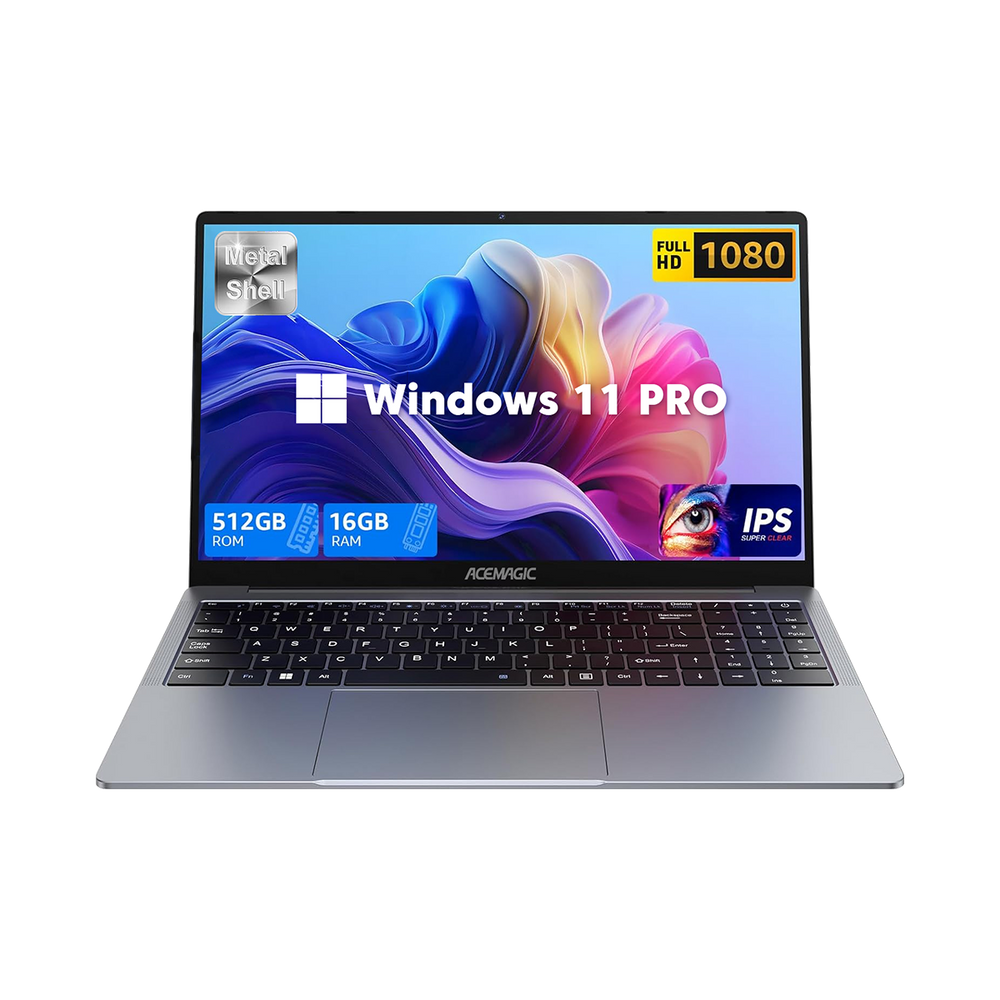
ACEMAGIC ‎TX15 Intel Twin Lake N150 15.6" Laptop

€248,00
€439,00
€248,00
Speichern €191,00
Bitte beeilen Sie sich! 2 noch auf Lager
CPU: Intel® Twin Lake N150
TYPE: 16GB RAM + 512GB SSD
Zwischensumme: €248,00

Versandgarantie

Versand ab Lager in Deutschland

Kostenloser Standardversand für Europa

Verkehrspolitik

Garantie

30 Tage problemloses Rückgaberecht

2 Jahre Garantie

Lebenslanger technischer Support

Garantierichtlinie

ACEMAGIC ‎TX15 Intel Twin Lake N150 15.6" Laptop

ACEMAGIC ‎TX15 Intel Twin Lake N150 15.6" Laptop

€439,00 €248,00

ACEMAGIC ‎TX15 Intel Twin Lake N150 15.6" Laptop

€439,00 €248,00
CPU: Intel® Twin Lake N150
TYPE: 16GB RAM + 512GB SSD

Mit dem Intel® Twin Lake N150, 16 GB DDR4 RAM und 512 GB M.2 SSD bietet dieses Notebook eine flüssige Performance für den Alltag.Das 15,6" Full-HD IPS-Display, das leichte Metallgehäuse (1,65 kg), 38-Wh-Akku, WiFi 5 & BT 5.0 sowie Windows 11 Pro machen es zum idealen Begleiter für Arbeit und Entertainment.

Processor Intel® Alder Lake N150 Processor, 4 cores/4 threads (Intel 7 process technology, 6 MB Smart Cache, base frequency 0.8 GHz, turbo frequency up to 3.6 GHz)
Graphics Card Intel® UHD Graphics (graphics frequency up to 1.0 GHz, 24 EUs)
RAM DDR4 16 GB, DDR4 SO-DIMM slot*1, supports up to 16 GB, supports up to 3200 MHz
Storage Configuration M.2 2280 SSD, M.2 2280 slot*1 (NVMe/SATA) adaptive, up to 2 TB
Wireless Connectivity WiFi 5, BT 5.0
System Windows 11 Pro
Dimensions 357.4*228.6*16.8mm
Weight 1.65kg
Material Aluminum alloy (die-cast)
Thermal Design Power (TDP) 6 W, maximum 15 W
Lithium Polymer Battery 7.6 V, 5000 mAh, 38 Wh
Storage 512 GB M.2 2280 SATA SSD
1× M.2-2280 slot, supports M.2 NVMe PCIe 3.0 SSDs or M.2 SATA SSDs, max. 2 TB per drive
Camera 1MP
Touchpad 40 channels
Power Supply DC 19 V / 2.1 A
Feature 180° hinge opening
Ports & Buttons USB 3.2*3
3.5 mm headphone jack*1
HDMI 1.4*1
DC-IN*1
USB-C*1
TF card slot*1

Ist auf dem S1 ein Betriebssystem vorinstalliert?

Außer der Barebone-Konfigurator sind alle anderen Konfigurationen bereits mit dem Windows 11-System vorinstalliert.

Wie behebt man das Problem, wenn S1 nicht mehr anspringt und der Bildschirm schwarz bleibt?

Reference tutorial video

Was kann man tun, wenn S1 eine SSD nicht erkennt?

Reference tutorial video

Anleitungsvideo für die Bedienung des S1-Bildschirms

Reference tutorial video

Schritt-für-Schritt-Anleitung zum Austausch von Arbeitsspeicher und SSD in S1

Reference tutorial video

Bedienungsanleitung für das S1-Steuerungsprogramm (Bildschirm- und Beleuchtungssteuerung

YouTube-Tutorial ansehen

Wie erstelle ich ein Profil für die Bildschirmeinstellungen von S1?

YouTube-Tutorial ansehen

Welche Schritte muss ich unternehmen, um den Bildschirm des Acemagic S1 Mini-PCs auszuschalten?

Der Bildschirm kann nur durch Ausschalten der S1-Stromversorgung ausgeschaltet werden.

Kürzlich Angesehene Produkte